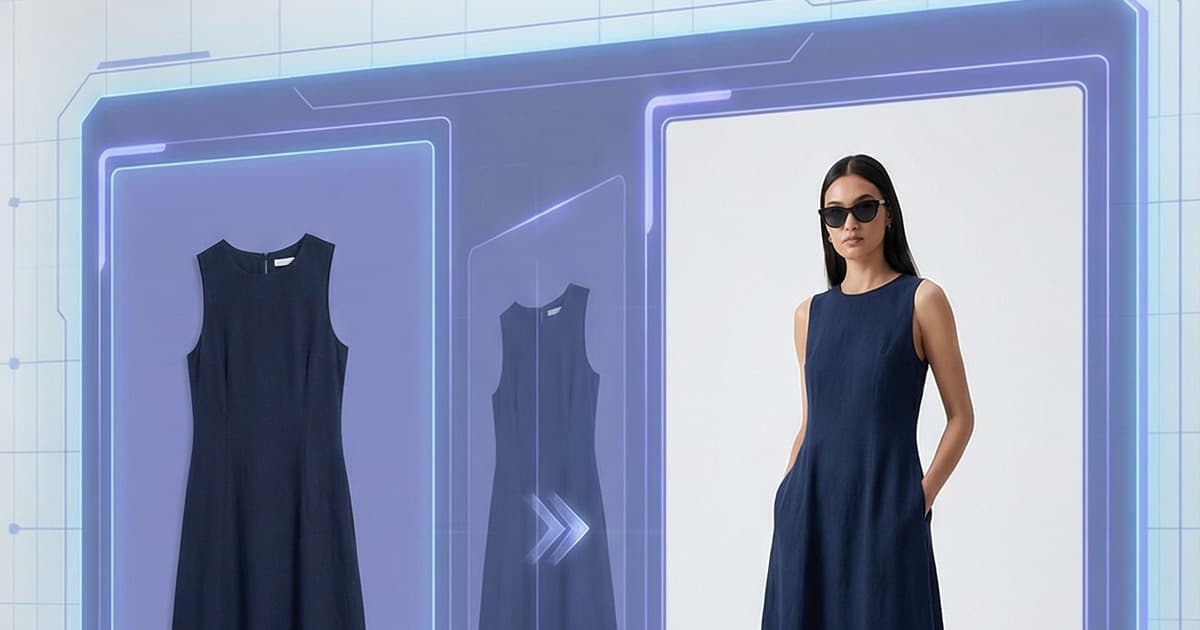
Quick answer: Flat lay to model AI (AI flat lay to on-model photography) uploads a flat-lay or ghost mannequin image, analyzes the garment's fabric, fit, color and pattern, and renders it on a virtual model as a production-ready product photo. Compared with a traditional shoot, it costs about $2-$15 per image instead of $200-$600 and takes hours instead of 3-6 weeks. That matters because on-model photos outperform flat-lays by 20-30% in conversion rate on average, so brands can finally put every SKU on a model.
Fashion ecommerce has a content problem. Not a creativity problem, not a branding problem - a pure production bottleneck. Every SKU needs photography. On-model photography, specifically. And traditional photo shoots don't scale.
An AI photo studio changes that equation entirely. You start with a flat-lay image - the product on a table or hanger - and end up with a polished, on-model photo that looks like it came out of a professional studio. No models, no photographers, no scheduling nightmares.
Here's why this matters, how the technology works, and what it means for fashion brands operating at scale.
The Real Cost of Traditional Fashion Photography
Ask any fashion brand operator about photo shoots and you'll hear the same story. It's expensive, slow, and almost impossible to scale when your catalog grows.
The costs stack up fast:
- Studio rental: $500–$3,000 per day, depending on location and equipment
- Professional photographer: $800–$5,000 per day
- Models: $150–$500/hour for professional models, often with minimum booking windows
- Stylist and makeup artist: Another $300–$1,000 per person
- Post-processing: $20–$100 per image for retouching
- Logistics: Shipping garments, booking travel, coordinating schedules
For a single SKU shot in three colorways with two model poses each, you're easily looking at $300–$600 per final image. Multiply that by a catalog of 200 products and the math becomes genuinely painful.
Speed is the other killer. A typical fashion photo shoot cycle - from brief to final retouched images delivered - takes three to six weeks. For seasonal drops, that's an entire launch cycle eaten by production. For trend-driven brands that need to move fast, it's a structural disadvantage.
Then there's scale. Most brands can't shoot every product on-model. They shoot their hero products and let the rest live as flat-lays - knowing that flat-lays convert significantly worse than on-model imagery.
According to industry data, on-model photos outperform flat-lay images by 20–30% in conversion rate on average. That gap is significant. And for most brands, closing it through traditional photography isn't financially viable.
What an AI Photo Studio Does: AI Flat Lay to On-Model Photography
An AI photo studio takes your existing product images and applies generative AI to produce on-model photography - automatically.
The workflow looks like this:
- You upload a flat-lay or ghost mannequin image of your garment
- The AI analyzes the product - fabric type, texture, drape, fit, colorway, pattern
- A virtual model is selected or assigned from a library, or a custom-trained model is used
- The AI renders the garment on the model - generating a photorealistic image that preserves every detail of the original product
- You download the finished on-model photo ready for your product page
The output isn't a placeholder or a rough visualization. It's a production-quality image indistinguishable from a traditional studio shot - at a fraction of the cost and in a fraction of the time.
This is what AI product photography for fashion looks like when it's built specifically for ecommerce operators rather than as a generic creative tool.
How Accuracy Is Preserved: Fabric, Fit, and Texture
The legitimate concern with AI-generated product photos is accuracy. If the AI gets the fabric texture wrong, the color slightly off, or the fit implausible, you end up with customer complaints and returns. That's worse than no photo at all.
This is where purpose-built AI photo studios differ from generic image generators.
Fabric and Texture Fidelity
A well-designed AI photo studio is trained specifically on garment photography. It understands the difference between how denim drapes versus how silk flows, how ribbed knit behaves under tension versus how a woven structure holds its shape.
The model preserves:
- Surface texture: Visible weaves, naps, ribbing, embroidery
- Sheen and light response: Matte cotton versus satin versus technical fabric
- Color accuracy: True-to-source colorway rendering without drift
This isn't achieved through a single inference pass. It requires a training pipeline focused on fashion specifically - learning the relationship between flat-lay product appearance and how that same product behaves on a body.
Fit Accuracy
Fit is the most complex variable in on-model fashion photography. A garment on a body stretches, compresses, falls, and drapes in ways that depend on both the garment's construction and the model's proportions.
An AI photo studio handles this by:
- Analyzing garment construction signals from the flat-lay (seam placement, panel structure, stretch indicators)
- Applying physics-aware draping that respects how the fabric would actually behave
- Calibrating to model proportions so the fit representation is realistic for the chosen model size
The result is that the on-model image doesn't just look like someone wearing a garment - it looks like that specific garment, fitting that specific body, in a way that's honest to the product.
Pattern Alignment
For printed and patterned garments - arguably the hardest case for generative AI - the system must maintain pattern continuity across seams and folds. Stripes need to match at seams. All-over prints need to scale correctly to the body. Logos and text need to render legibly and in the right position.
This is a high bar, and not all AI tools meet it. But in a dedicated AI photo studio environment, pattern handling is treated as a core requirement, not an edge case.
The Model Swap Feature
One of the most powerful capabilities of an AI photo studio is the ability to swap virtual models without re-shooting anything.
Traditional fashion photography is constrained by the model you booked. You get the poses you shot, on the body you hired. If you want to show the same garment on a different body type, you're booking another shoot.
With an AI photo studio, model swap means exactly what it sounds like:
- Take any on-model image (or generate one from flat-lay)
- Select a different model from the library
- The AI re-renders the garment on the new model - same product, same accuracy, different representation
This has real business implications:
Inclusive sizing representation: Brands selling across size ranges can now show every product on multiple body types without the cost of multiple shoots. A size 2XL variant can be shown on an appropriately-sized model rather than relying on a single sample size.
Regional market adaptation: Models can be swapped to reflect the demographic preferences of different markets. The same product, photographed once, can be adapted for European, US, and Asian storefronts with appropriate model representation.
Pose variation: Need the same garment in a walking pose, a standing pose, and a close-up detail shot? Model swap and pose control give you that variety from a single source image.
A/B testing: Run conversion tests with different model presentations to understand what resonates with your specific audience - without commissioning multiple shoots.
How to Swap a Product into an Existing Photo with AI
If you already have a strong on-model or lifestyle photo and want a different product in it, you are doing the reverse of model swap: keep the scene, change the garment. A practical workflow:
- Start with a clean product image. A flat-lay or ghost mannequin shot of the new garment, front-facing, evenly lit, with the full silhouette visible.
- Pick the reference photo. Choose the existing image whose model, pose and setting you want to keep. Similar garment categories swap best, such as a tee for a tee or a dress for a dress.
- Generate the new version. The AI renders the new garment on the same kind of model and setting, adjusting drape and fit to the pose.
- Check the details. Compare the output with the product image: color, print alignment at seams, logos, buttons and hem length. Reject anything that drifts.
- Keep the set consistent. Reuse the same scene and model for every SKU in a collection so the category page reads as one shoot.
In Tellos AI Photo Studio the flow starts from the flat-lay: generate the garment on-model in the setting you want, then use model swap to change the model while the garment, pose and setting stay intact. For what to check before publishing, see our AI generated clothing photos accuracy guide.
Custom Brand-Trained Models
Off-the-shelf virtual models get you a lot of the way there. But for brands with a defined aesthetic - a specific look, a particular body standard, a signature model identity - custom training takes the AI photo studio to a different level.
Brand-trained AI models are virtual models trained on your brand's photography. You provide a dataset of your existing professional shots, and the system learns:
- Your preferred model aesthetic and body proportions
- Your shooting style (lighting angles, pose tendencies, background preferences)
- The relationship between your product presentation and your model presentation
The result is an AI model that feels native to your brand. Not a generic virtual model wearing your clothes - a virtual representation of how your brand presents fashion.
This matters for brand consistency at scale. When you're producing hundreds or thousands of product images per season, a custom-trained model ensures every image looks like it belongs in the same catalog.
Custom models also solve a specific problem for brands that use recurring models - influencers or brand ambassadors who appear regularly in product imagery. With a custom-trained model, you can extend that familiar face across your entire catalog without the ambassador having to physically appear in every shot.
Comparing the Old Way vs. the AI Way
Here's what the production reality looks like side by side:
| Traditional Photography | AI Photo Studio | |
|---|---|---|
| Cost per image | $200–$600 | $2–$15 |
| Turnaround time | 3–6 weeks | Hours |
| Minimum viable batch | 20–50 images (to justify shoot cost) | 1 image |
| Model flexibility | One booking per shoot | Unlimited swaps |
| Scale ceiling | Budget-constrained | Catalog-wide |
| Pattern/texture accuracy | Ground truth | High fidelity |
| Body diversity | Costly additional shoots | Built-in |
The AI path isn't just cheaper - it removes the structural constraints that make fashion content production a bottleneck.
Where This Fits in Your Broader Content Stack
An AI photo studio for on-model photography is one piece of a larger content production puzzle. Fashion ecommerce brands need static imagery for product pages, but they also need video - for social, for ads, for storefronts.
The same product assets that feed your AI photo studio can feed your video production workflow. A flat-lay image becomes an on-model photo; that same asset can become a short-form video ad showing the garment in motion, or a social clip styled for a specific platform.
This is the direction that content production is moving: a single product asset, intelligently adapted across formats and surfaces. Flat-lay to on-model. Still to video. Product page to paid social. The AI layer handles the transformation - you focus on the product.
For brands that are serious about this kind of content efficiency, the tools exist today. The question is whether you're using them or still booking photo shoots six weeks in advance for every new drop.
What to Look for in an AI Photo Studio Tool
Not all AI photo studios are built for fashion ecommerce. Here's what to evaluate:
Garment-specific training: Generic image generators don't have the fashion-specific understanding needed for accurate on-model results. Look for tools trained specifically on apparel.
Fabric accuracy benchmarks: Ask for examples across fabric types - knits, wovens, technical fabrics, prints. If the demo examples all use simple solid-color basics, that's a signal.
Pattern and print handling: Test with your hardest cases - small repeat prints, text-heavy graphics, complex patterns.
Model diversity: A limited model library limits your ability to represent your full customer base. Prioritize platforms with broad representation built in.
Batch processing capability: If you need to produce imagery at catalog scale, you need batch workflows, not a one-at-a-time interface.
Integration with existing tools: Export formats, API access, and workflow integrations determine how easily the tool fits into your production stack.
Custom model training: If brand consistency matters, check whether custom training is available and what the onboarding process looks like.
Frequently Asked Questions
What is AI flat lay to on-model photography?
It is a workflow where an AI photo studio takes a flat-lay or ghost mannequin image of a garment and generates a photorealistic image of that garment worn by a virtual model. The system analyzes fabric type, texture, drape, fit, colorway and pattern, then renders the product on a model from a library or a custom brand-trained model, ready for your product page.
How much does AI on-model photography cost compared with a traditional shoot?
Traditional on-model photography typically lands at $200-$600 per final image once studio rental ($500-$3,000 per day), photographer ($800-$5,000 per day), models, stylists and retouching are added up. An AI photo studio produces on-model images for roughly $2-$15 each, with a minimum batch of one image instead of 20-50, and turnaround in hours rather than 3-6 weeks.
How do fashion brands scale product photography across hundreds of seasonal SKUs without a studio?
They convert existing flat-lay or ghost mannequin images into on-model photos with an AI photo studio, using batch processing to cover the whole catalog instead of only hero products. Model swap then adds size, regional and pose variations without reshoots, and a custom brand-trained model keeps hundreds or thousands of images per season visually consistent, so seasonal drops can be ready on day one.
Do on-model photos convert better than flat-lay photos?
Yes. According to industry data cited in this guide, on-model photos outperform flat-lay images by 20-30% in conversion rate on average. Most brands historically shot only hero products on-model and left the rest as flat-lays because shoots were too expensive. AI on-model photography closes that gap by making on-model imagery affordable for every SKU and every size variant.
Does AI keep fabric, fit and prints accurate on the model?
A purpose-built fashion AI photo studio is trained on garment photography, so it preserves surface texture, sheen and true-to-source color. It reads construction signals like seams and panels, applies physics-aware draping, and calibrates fit to the chosen model's proportions. Prints are the hardest case: stripes must match at seams and logos must stay legible, so always test with your most complex products.
What should I look for in a service that converts flat-lay photos to AI model shots?
Look for garment-specific training rather than a generic image generator, proof of accuracy across knits, wovens, technical fabrics and prints, and a diverse model library. For catalog work you also need batch processing, export formats or API access that fit your stack, and custom model training if brand consistency matters. Test with your hardest items, such as small repeat prints and text-heavy graphics.
How do I swap a product into an existing photo with AI?
Start with a clean flat-lay or ghost mannequin image of the new product, choose the existing photo whose model, pose and setting you want to keep, and generate the new version so the AI renders your garment in that scene. Then check color, prints, logos and hem length against the product image. Swaps work best between similar garment types, such as a tee for a tee.
Which product photo style converts best: on-model, flat lay or mannequin?
On-model. According to industry data cited in this guide, on-model photos outperform flat-lay images by 20-30% in conversion rate on average. Flat-lay and ghost mannequin shots are still useful: they are cheaper to produce, work as clean secondary images, and are exactly the input an AI photo studio converts into on-model photos. So you can keep shooting flat lays and still show every SKU on a model.
Is there a free AI flat lay tool?
Yes. The free Tellos AI packshot generator creates white-background packshots in flat lay, invisible hanger and ghost mannequin styles from your product photos. To turn those flat lays into on-model images, use Tellos AI Photo Studio, which has a free tier to start.
The Production Bottleneck Is Solved. Now What?
When you remove the cost and time constraints from on-model photography, the strategic question changes. It's no longer "which products can we afford to shoot?" - it's "what content strategy do we want to execute?"
That's a better problem to have.
Every product in your catalog can have on-model imagery. Every size variant can have appropriate representation. Every market can have relevant model presentation. Every seasonal drop can be ready on day one.
Fashion brands that are building for scale are already rethinking their content pipelines around AI tools. The brands that are moving fastest aren't the ones with the biggest photo shoot budgets - they're the ones that stopped thinking about photo shoots at all.
Start Producing On-Model Photos at Scale with Tellos
Tellos AI Photo Studio is built specifically for fashion ecommerce brands that need on-model photography at scale. Upload your flat-lay images, choose from a diverse model library or bring your own custom-trained model, and get production-ready on-model photos in hours - not weeks.
No studio. No models to book. No six-week turnaround. Just accurate, on-brand on-model photography that scales with your catalog.
See what Tellos AI Photo Studio can do for your brand →
Related reading: Explore how AI is transforming ecommerce content production across formats - from product videos to social ads - and why the fastest-growing brands are rebuilding their content stacks around AI-native workflows.