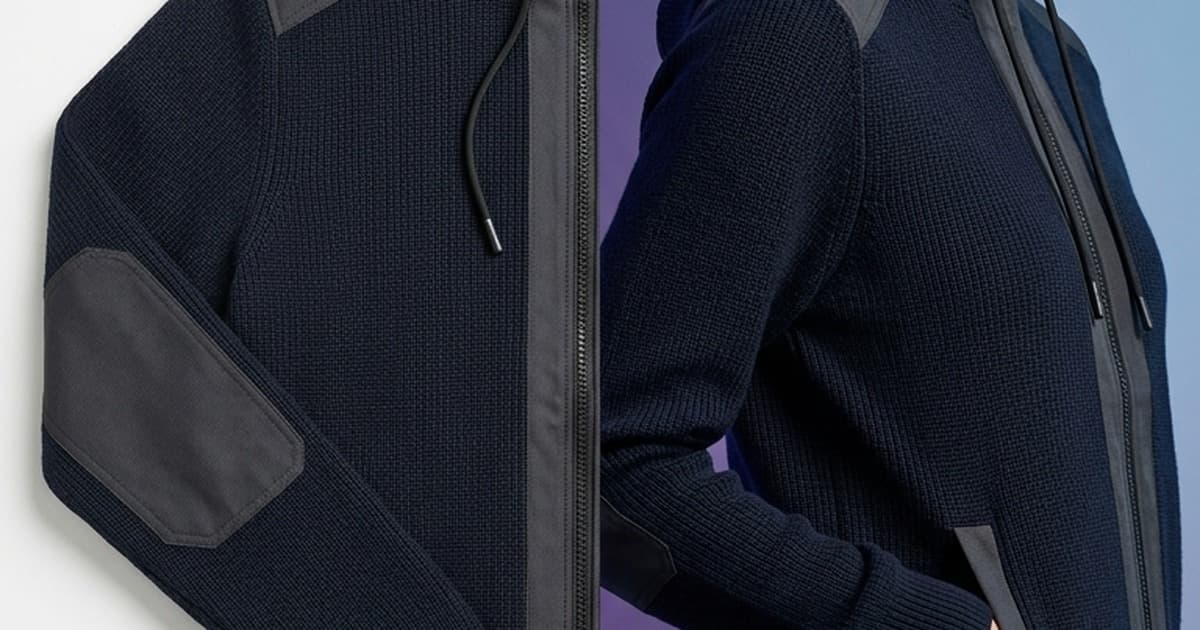
Quick answer: AI generated clothing photos are accurate enough for product pages when the tool works from your actual product images and, ideally, is trained on your catalog. Generic AI image generators still get fabric, fit, color, and details wrong, so their output is not production-ready. Brand-trained models preserve texture, colorway, and fit, and handle t-shirts, knitwear, wovens, trousers, and dresses best, while complex tailoring and engineered prints need closer review.
If you've ever asked an AI to put your product on a model and gotten back something that looked like your jacket had a fever dream about itself, you're not alone. The skepticism around AI generated clothing photos is earned. Early tools were bad. Some still are.
But the technology has moved fast - and the gap between "generic AI clothing image" and "production-ready product photo" is now almost entirely explained by one variable: whether the model was trained on your product or not.
This post gives you the honest breakdown. Where AI clothing photography excels, where it still struggles, what separates a tool that works from one that wastes your time, and how to know whether your PDPs are ready for AI-generated imagery.
What People Mean When They Say "AI Generated Clothing Photos"
The phrase covers a wide spectrum. At one end: someone typing "woman wearing a red linen blazer" into Midjourney and hoping for the best. At the other: a purpose-built AI clothing photo generator that analyzes your actual flat-lay image, understands the fabric, and renders it on a model with the accuracy of a professional studio shoot.
Those two things are not comparable. They share a name and very little else.
The confusion between them is the source of most skepticism. Brands try the consumer tool, get unusable output, conclude "AI clothing photography doesn't work," and move on - missing the genuine production capability that exists in the more purpose-built category.
So before we talk about accuracy, it's worth being specific about what kind of AI clothing photo generator we're actually evaluating.
For this post, we're talking about tools designed specifically for ecommerce product photography: systems that take your product image as input, preserve its visual properties, and output a photorealistic on-model image ready for a product detail page.
The Accuracy Question: Fabric, Fit, and Texture
These are the three things that matter most for clothing photography, and they're also the three places where AI most visibly succeeds or fails.
Fabric Rendering
Fabric is hard. Every material behaves differently under light: how silk reflects, how denim creases, how ribbed knitwear stretches and compresses, how chiffon flows. Getting this right is less about raw image quality and more about training data.
Generic AI gets fabric wrong in predictable ways. It collapses categories. A brushed mohair and a poly-blend sweater look roughly the same. A technical athletic fabric and regular cotton are indistinguishable. The AI has learned "fabric" in general - not your fabric specifically.
This matters more than it might seem. Fabric communication drives perceived value. A shopper looking at a £300 cashmere piece is buying the texture and weight of it. If the AI-generated image makes it look synthetic, you haven't just created an inaccurate photo - you've actively undermined the conversion.
Brand-trained models get fabric right. When the AI has been trained on hundreds of images of your specific products - your wovens, your knits, your technical materials - it builds a representation of how those materials actually behave. The output shows fabric that looks like what you sell.
The difference shows up most clearly in:
- Surface texture: visible weaves, naps, ribbing, and embroidery detail
- Light response: matte versus sheen versus technical reflectivity
- Movement: how fabric drapes, gathers, or holds structure
Fit Accuracy
Fit is where generic AI fails most catastrophically for ecommerce use. A garment's fit on a model is one of the primary purchase signals for clothing shoppers. Get it wrong and you generate returns, complaints, and broken trust.
Generic AI doesn't know your garment's fit. It makes educated guesses based on what category the garment appears to be, then generates something that looks plausible from a distance. On a product page where your customer is studying every detail, "plausible from a distance" doesn't cut it.
Common fit failures from generic tools:
- Shoulder seams in the wrong position
- Hem length that contradicts the actual product dimensions
- Proportions that drift from your actual grading
- Collar behavior that doesn't match the construction
- Sleeve fit that looks correct in silhouette but wrong in detail
What changes with a purpose-built AI photo generator: The system is working from your actual product image. It's not guessing what the garment looks like - it knows. The on-model rendering preserves the fit information from your flat-lay or ghost mannequin image. The shoulder sits where it actually sits. The hem falls where it actually falls.
That said, there are limits. Complex fit scenarios - a very structured jacket with precise tailoring, a garment with significant boning or structure - are harder to render accurately than simpler shapes. We'll come back to that when we discuss when AI photos are and aren't ready for PDPs.
Texture and Detail
This is often what ecommerce teams mean when they say "it doesn't look real." Texture is the micro-level detail - the individual stitches in an embroidery, the tooth of a tweed, the sheen pattern in a jacquard. This is where image quality meets training specificity.
Generic AI generates plausible texture rather than accurate texture. It looks like a garment, but it doesn't look like that garment.
Brand-trained models working from your product images can preserve surface detail that a generic tool would invent. The pattern placement lands correctly. The embroidery looks like your embroidery. The jacquard structure matches the actual weave.
What Generic AI Gets Wrong: A Practical List
If you're evaluating an AI clothing photography tool, these are the failure modes to watch for:
Color drift. The AI shifts your colorways - sometimes subtly, sometimes dramatically. Your dusty rose becomes bubblegum. Your navy reads as black. This is a returns driver.
Pattern distortion. Stripes that should be straight bow or warp. Checks that should align misalign. Prints that should tile tile incorrectly. Any garment with a strong graphic element is particularly vulnerable to this.
Style code divergence. Every brand has a visual language - the temperature of their photography, the background treatment, the styling approach. Generic AI produces something that looks like fashion photography in general, not like your brand's photography specifically.
Wrong body type. Generic tools default to whatever body type dominated their training data. That's often not your target customer, your stated diversity commitments, or the fit model you actually use for your specific size run.
Hallucinated accessories and details. The AI adds buttons that don't exist, changes the collar, invents a pocket. These are subtle and easy to miss in review, but they create product expectation mismatches that drive returns.
Background inconsistency. Without brand-specific training, the AI generates backgrounds that don't match your existing imagery. Your PDP aesthetic looks fractured when you mix AI and traditional content.
What Brand-Trained Models Do Differently
The core difference is the training input. Generic AI learns from the internet. Brand-trained models learn from your catalog.
When an AI clothing photo generator is fine-tuned on your brand's visual assets, it builds representations of your specific products, your specific aesthetics, and your specific quality markers. The output doesn't just look like clothing - it looks like your clothing, photographed in your style, on the kind of model that fits your casting brief.
This is a meaningful operational difference, not just a marketing distinction. As we covered in our post on custom AI models for fashion brands, the gap between generic and brand-trained AI is visible in every element: fabric fidelity, fit accuracy, style consistency, and model casting.
The practical result is that brand-trained AI generated fashion images can pass a quality review that generic AI cannot. They can sit alongside your traditional photography on a PDP without breaking visual coherence. That's the bar that matters for production use.
Before and After: What the Shift Actually Looks Like
Let's make this concrete with some scenarios.
Scenario 1: A structured denim jacket
Generic AI input: flat-lay image. Output: a model wearing something that reads as denim, with the approximate silhouette of your jacket. Collar is slightly wrong. Button placket has the wrong spacing. Chest fit is plausible but not accurate. Color is about 15% lighter than the actual product.
Brand-trained model input: same flat-lay image. Output: a model wearing the jacket with the correct collar construction, accurate button placement, true colorway, and the specific denim texture and wash visible in your original shot. The fit matches your grading. The result is indistinguishable from a studio photograph.
Scenario 2: A silk slip dress
Generic AI struggles with silk because it needs to understand how this specific silk moves and reflects, not how silk in general behaves. Output typically shows exaggerated sheen or incorrect drape - something that reads as satin when you sell matte silk, or something stiff when the actual garment flows.
Brand-trained model working from your product imagery renders the specific hand of your fabric. If you've shot your slip dress as a flat-lay, the AI has learned the visual signature of that material and translates it accurately to an on-model image.
Scenario 3: A knit sweater in four colorways
This is where the efficiency case for AI generated clothing photos becomes compelling. Shooting four colorways traditionally means four separate products on set, multiple styling iterations, coordination overhead. With AI, you shoot one colorway, then generate the others. The AI knows your yarn weight, your stitch structure, your body shape - it just changes the color. Four PDPs for the cost and time of one shoot.
When AI Photos Are Ready for PDPs - And When They're Not
This is the question that actually matters for your production decisions.
AI photos are ready for PDPs when:
The product has defined, photographable structure. T-shirts, knitwear, woven tops, trousers, dresses, and most casual silhouettes render very well from flat-lay inputs. The AI has enough structural information to work from.
You're using a brand-trained model. If the tool has been trained on your specific catalog, color accuracy and material fidelity are reliable enough for production use. As we explained in our AI Photo Studio for fashion post, the flat-lay to on-model workflow is production-ready for the vast majority of garment categories.
You're generating colorway or style variants. Hero product shot on model once, AI generates variants. This is one of the strongest use cases - the base product is already validated, you're just extending coverage.
You need to test a product before committing to a full shoot. AI-generated imagery is fast enough that you can generate placeholder PDPs while the shoot is being scheduled, or test a product concept before it's even in production.
You've replaced ghost mannequin or flat-lay imagery. If your current alternative is flat-lay photography, almost any quality-conscious AI clothing photography tool will produce imagery that converts better. The mannequin to model AI workflow is one of the clearest ROI cases in fashion ecommerce today.
AI photos need more care when:
The garment has complex tailoring. Precisely structured jackets, tailored suiting, and garments with significant internal construction (boning, interfacing, heavy padding) are harder to render accurately from flat-lay inputs because the structure isn't visible in a 2D image. Results can be good but need closer review.
Pattern placement is critically brand-relevant. If your garment has a specific engineered print, placement embroidery, or graphic element where exact positioning matters, verify the AI output against your spec before publishing.
You're in luxury territory where detail is the product. At the higher end of the market, customers are scrutinizing imagery in ways casual shoppers aren't. AI-generated imagery is increasingly capable here, but the review bar is higher. Use brand-trained models and plan for closer quality checking.
You're using a generic tool, not a purpose-built one. This should be obvious from everything above, but it bears repeating: generic AI clothing photo generators are not production-ready for PDPs. A purpose-built ai clothing photography tool that works from your product images is a different category.
The Cost Reality
The financial case for AI clothing photography is significant, and it's documented. As we covered in our fashion photography cost breakdown for 2026, a single traditional on-model shoot day runs $5,000 to $25,000 when everything is counted honestly.
That means:
- Photographer: $1,000-$3,500/day
- Studio rental: $300-$1,500/day
- Model fees: $600-$4,000/day per model
- Hair and makeup: $400-$1,200/day
- Retouching: $20-$100 per final image
For a brand shooting 200 SKUs per season with two model angles per product, the traditional photography bill is often $60,000 to $120,000 per season before post-production.
AI clothing photography at scale brings that to a fraction of the cost - and removes the scheduling, logistics, and lead time entirely. The 3-6 week shoot cycle compresses to hours.
The question isn't whether AI clothing photography is cheaper. It obviously is. The question is whether it's good enough. And for most product categories, with the right tool, the answer is yes.
Diversifying Your Model Representation with AI
One area where AI generated fashion images offer a specific advantage beyond cost is representation diversity. Traditional photography forces you to choose a small number of models and hope they represent enough of your customer base. The cost of adding a model to a shoot compounds quickly.
AI changes that math. Once your product imagery is in the system, you can generate the same product on a diverse set of virtual models - different body types, skin tones, and styling contexts - without the per-model cost of a traditional shoot. This connects directly to diversifying product pages with AI model swap, which some brands are now treating as a standard part of their PDP strategy.
For brands that have made commitments to representation in their marketing, AI makes those commitments operationally achievable at catalog scale rather than just at hero product level.
Frequently Asked Questions
Are AI generated clothing photos accurate?
It depends on the tool. Generic AI image generators produce plausible but inaccurate garments, with color drift, warped patterns, and invented details. Purpose-built AI clothing photo generators that work from your flat-lay or ghost mannequin image preserve fit and fabric far better, and brand-trained models trained on your catalog are accurate enough for most PDPs. Always run AI output through the same QC process as traditional photography.
How can you tell if a clothing photo is AI generated?
Look for the common failure modes of generic AI: colors that are slightly off from the real product, stripes or checks that bow or misalign, buttons, pockets, or collars that do not match the garment, fabric that looks synthetic or overly shiny, and shoulder seams or hems in the wrong place. Brand-trained output from real product images avoids most of these, which is why it can sit alongside studio photography.
Do AI models and avatars show clothing fit accurately?
Generic tools guess fit from the garment category, so shoulder seams, hem length, sleeve fit, and proportions often drift from your actual grading. A purpose-built generator that starts from your real product image keeps the fit information from the flat-lay, so the shoulder and hem sit where they actually sit. Very structured garments with boning, interfacing, or precise tailoring are still harder and need closer review.
Which garments work best for AI clothing photography?
Products with defined, photographable structure render best from flat-lay inputs: t-shirts, knitwear, woven tops, trousers, dresses, and most casual silhouettes. Colorway variants are one of the strongest use cases, since you shoot one colorway and generate the rest. Complex tailoring, engineered prints, placement embroidery, and luxury pieces where detail is the product can still work, but plan for a stricter review before publishing.
Is AI clothing photography cheaper than a photo shoot?
Yes. A single traditional on-model shoot day runs roughly $5,000 to $25,000 once photographer, studio, models, hair and makeup, and retouching are counted. For a brand shooting 200 SKUs per season with two angles each, that is often $60,000 to $120,000 per season. AI clothing photography costs a fraction of that and compresses a 3-6 week shoot cycle into hours.
Can AI generated clothing photos replace ghost mannequin or flat-lay images?
Yes, and this is one of the clearest wins. If your current PDP imagery is flat-lay or ghost mannequin, a quality-focused AI clothing photography tool can turn those same images into on-model photos that give shoppers a better sense of fit and drape. You can also show the same product on diverse body types and skin tones without paying for extra models on set.
What's the difference between a general AI image generator and a purpose-built product photo tool?
A general AI image generator creates a picture from a text prompt and invents garment details it has never seen, so color, prints, buttons and fit drift. A purpose-built AI product photo tool starts from your actual product image, such as a flat-lay or ghost mannequin shot, and is designed to keep that garment's fabric, color and construction. Brand-trained versions also learn your catalog. For PDPs, only the second category is production-ready.
Which AI fashion photography tool keeps prints, logos, fabric texture and fit accurate?
Choose a tool that works from your real product photos, offers training on your own catalog, and can show results on your hardest items: small repeat prints, logos and text graphics, sheer or textured fabrics, and structured tailoring. Test those pieces before committing and keep a QC step for every batch. Tellos AI Photo Studio is built around this workflow.
The Honest Summary
AI generated clothing photos are not a magic solution. Generic tools produce unreliable results that aren't production-ready for most ecommerce use cases. The skepticism is justified - if you've tested a consumer AI image generator on your product catalog and gotten bad output, that's a fair reflection of what generic AI can do.
The story changes substantially with purpose-built AI clothing photography tools, and changes again with brand-trained models. The technology in this category has reached the point where, for the majority of product categories and use cases, AI-generated imagery is accurate enough for PDPs - and delivers that accuracy at a fraction of the cost and time of traditional photography.
The practical checklist for any brand evaluating this:
- Are you using a purpose-built tool? Generic AI image generators are a different category from AI product photography platforms.
- Does the tool work from your actual product images? Input specificity drives output accuracy.
- Is there brand training available? Brand-trained models are significantly more accurate than generic ones.
- What are your most common product categories? Start with the categories where AI excels - knitwear, casualwear, wovens - before pushing it toward complex tailoring.
- What's the review workflow? AI-generated images should go through the same QC process as traditional photography.
Get those five things right and AI generated clothing photos are not a compromise. They're an upgrade to your production operation.
Ready to See What AI Photography Can Do for Your Catalog?
Tellos AI Photo Studio turns your flat-lay and ghost mannequin images into production-ready on-model photos - with brand-trained accuracy across fabric, fit, and texture. No shoots. No scheduling. No post-production backlog.
Brands using Tellos are processing full seasonal catalogs in days rather than weeks, at costs that make the ROI case obvious. And the output sits on PDPs alongside traditional photography without breaking visual consistency.
Try Tellos AI Photo Studio free - upload your first product and see what the output looks like before committing to anything. The comparison to your current photography workflow will do the selling.